
Memolli vs Apple Notes, Notion, and Evernote: A Focused Alternative for Food & Drink Reviews
Memolli is a more focused and low-friction alternative to general note taking apps like Apple Notes, Notion, Evernote, and Bear.
Written by: Charlie Murphy
Memolli is a personal journal for the food, drinks, and places you try; designed to be visual-first, fast, and structured with minimal setup.
Like many people, I originally tried to keep track of these things using general note-taking apps like Apple Notes, Notion, Evernote, Bear, or even spreadsheets. They’re all excellent tools, but over time I found myself spending more energy thinking about how to capture my notes than actually capturing them.
That frustration is what led me to build Memolli: a more focused, low-friction alternative designed specifically for remembering the things you try.
Like comparing apples to apple pie
General note taking apps are like apples, you can make them into many different dishes… but it takes work. Memolli is more like apple pie: it’s tasty and no prep required. Maybe it’s not the exact dessert you wanted, but you decided you didn’t have time to bake it or just didn’t want to. And I say all this as someone who loves to cook. Sometimes it’s just easier to buy pre-made food, especially if it’s from a good bakery that specializes in pie.
You can still use both though. For example, I still use Apple Notes for reading notes and planning work. I used to use Evernote, then Clickup, and tried Notion, but I always found myself over-complicating things with all the features they offer. The simplicity in Apple Notes forces you to just focus on writing, rather than thinking about how to write or organize things (the deep integration with Apple devices is a big factor too of course).
How Memolli is different
Memolli is not trying to replace those general-purpose note taking apps. Instead, it aims to be a more focused and low-friction tool for helping you remember the things you tried. Here are some of the ways Memolli is different:
Maps integration
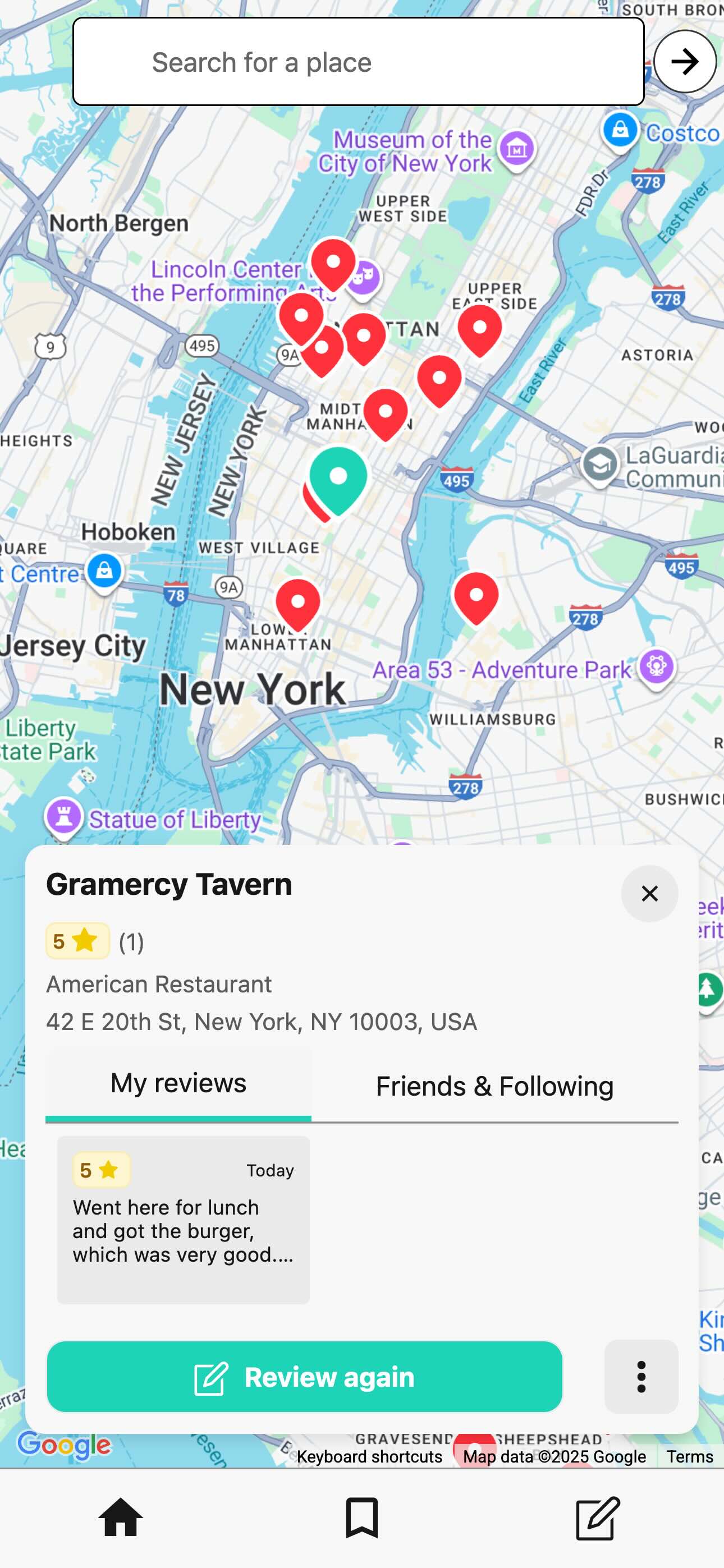
Memolli treats location as a first-class part of the experience, letting you browse your entries on a map and start new entries directly from it. This makes it much easier to recall restaurants you visited in a specific area, or to quickly see what you tried the last time you visited a place.
You might ask how this compares to apps like Yelp or Google Maps. I’ve written a separate post comparing Memolli with those tools in more detail. See my comparison of Memolli vs Yelp and Google Maps.
| App | Maps Integration? |
|---|---|
| Memolli | ✅ Yes |
| Apple Notes | ✅ Yes |
| Notion | ✅ Yes |
| Evernote | ❌ No |
| Bear | ❌ No |
Visual-first design
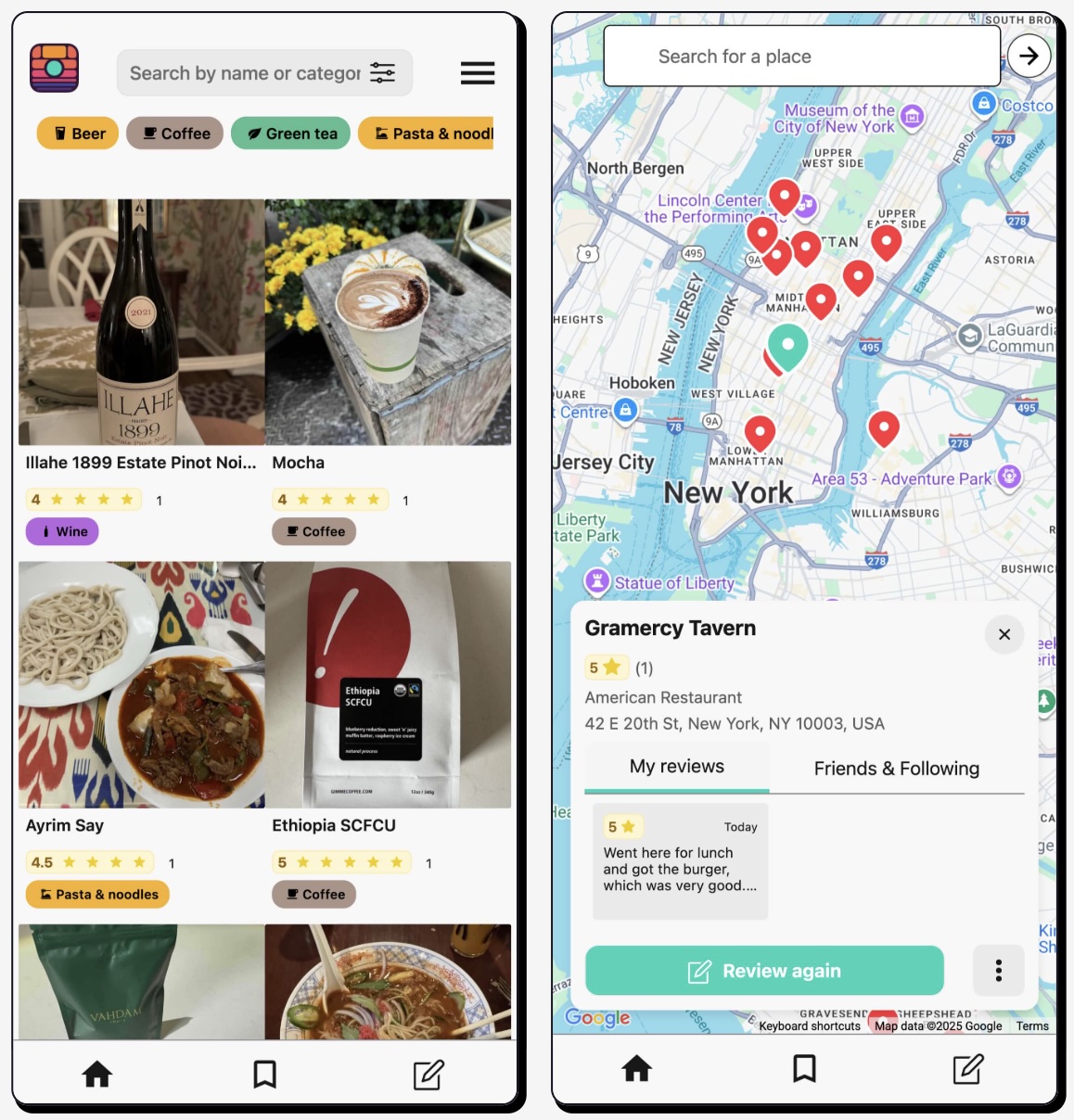
Memolli is visually driven, making it easy to browse your entries through photos or on a map. Your photos add rich context and often bring experiences back to life more vividly than text alone.
Structured reviews
You can stick to just using notes, ratings, and images, but Memolli also provides a structured format for reviews. You can tag a review with a category. Each category is essentially a template, letting you customize the fields you fill out (e.g. tasting notes for coffee). All this structure makes it easier to search through and sort your entries later. Letting you do things like:
- Filter by category. Like Coffee, Wine, etc.
- Sort by rating or date tried.
- Organize your reviews into lists
- And more…
In the future, we plan to add more advanced search features, like semantic search powered by AI. For example, “What was my favorite coffee shop in San Francisco?” or “Show me all the Italian restaurants I tried last year.”
Data ownership
Your data is yours, forever. That’s why Memolli doesn’t try to “trap” your data in the app, so we provide an easy way for you to export all your entries to plain text files along with your images. In the future, we plan to offer even more export and backup options.
Offline access & syncing across devices
There are two ways you can use Memolli:
(1) You can download the iOS or Android app and not sign up for an account. In this case, all your data is stored locally on your device, and you can use Memolli completely offline.
(2) You can sign up for a free account with your email. In this case, your data is synced across all your devices through our secure cloud service. Any changes you make on one device are automatically reflected on your other devices.
Why is offline access important? There have been many times where I had no cell signal while at a grocery store to pick out coffee or beer and couldn’t remember if I liked something. Or I was at a restaurant with spotty Wi-Fi and wanted to jot down a quick note about a dish I tried.
| App | Automatic offline access? |
|---|---|
| Memolli | ✅ Yes |
| Apple Notes | ✅ Yes |
| Notion | ⚠️ Manually enabled for each note |
| Evernote | ⚠️ Manually enabled for each note |
| Bear | ✅ Yes |
The real difference: cognitive load
The biggest difference between Memolli and general-purpose note taking apps isn’t just about features. It’s about mental overhead.
With most note apps, you’re constantly making small decisions:
- How should I structure this?
- Is this a tag or a heading?
- Will I be able to find this later?
None of those decisions are hard on their own, but they add up. Over time, that friction makes it less likely you’ll actually keep track of the things you care about.
Memolli is designed to remove those questions entirely. It gives you just enough structure to make your past experiences useful later, without asking you to design or maintain a system. You open the app, add what you tried, and move on with your day.
If you enjoy building systems or your “second brain”, something like Notion might be the right fit. But if you want something that works immediately (especially on your phone) Memolli is designed for that.
Less thinking. More remembering.