
How to Keep a Private Restaurant List
A simple guide to building a private restaurant list you can actually use, with notes, ratings, photos, maps, and trusted recommendations.
Written by: Charlie Murphy
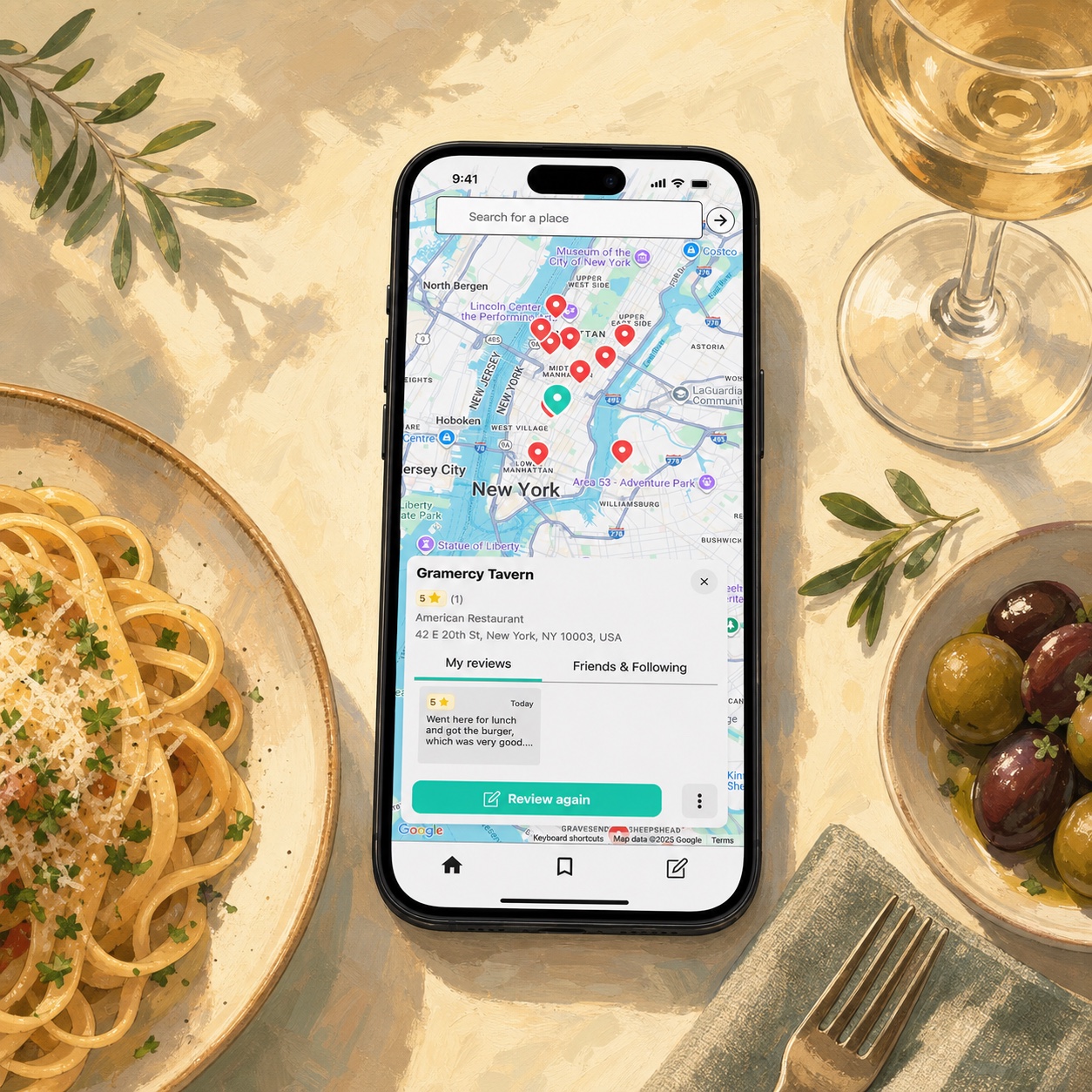
Most restaurant lists start with good intentions. You save a place in Google Maps, text yourself a recommendation, take a photo of a menu, or write “that pasta place near the park” in a notes app. Then, when you actually need the list, it is scattered everywhere.
Memolli is meant to solve that problem. It gives you one private place to keep your restaurant notes, ratings, photos, maps, lists, and recommendations, so your food memories are not scattered across Google Maps lists, photo libraries, text threads, and half-forgotten notes.
Here is a short guide to keeping a private restaurant list that actually works for you.
1. Decide what your list is for
Before choosing an app or format, decide what kind of restaurant list you actually want, since not all apps are suited for every type of list. Some common lists include:
- Places to try: restaurants, bars, cafes, bakeries, and food trucks you want to remember later.
- Favorites: places you already love and want to recommend.
- Travel lists: restaurants for an upcoming trip or city-by-city food memories.
- Friend recommendations: trusted suggestions from people who know your taste.
- Personal reviews: your own notes on what you ordered, what you liked, and what you would skip next time.
Memolli helps by letting you track every restaurant you have been to, then organize those places into lists for different situations. You can keep a list private for yourself, share a public link when you want to send recommendations to someone else, or invite people you know to view or contribute to a shared list.
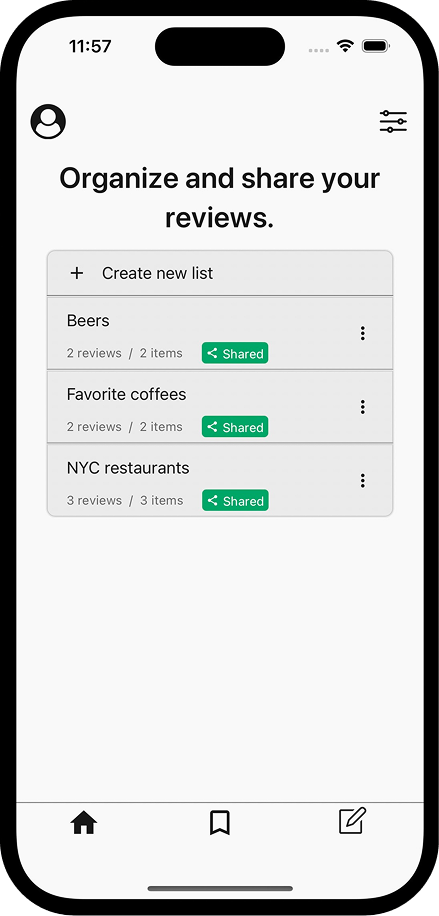
Memolli lets you organize restaurants into private and shared lists.
2. Do you want your notes to be private or public?
Public review platforms are useful for discovery, but they are not always the best place to keep personal notes. On Yelp or Google Maps, you may feel pressure to write something complete, fair, or helpful to strangers. This can happen, for example, when you visit a new restaurant and you weren’t satisfied, but you don’t want to post a negative review publicly.
A private restaurant list can be messier, but more honest:
- “Great burger, but loud.”
- “Good for parents visiting.”
- “Would come back for the patio.”
Those are the kinds of notes that are likely only useful to you. They do not need to be polished. They just need to be enough to remind you what your experience was actually like.
If you want a deeper comparison, I wrote more about Memolli as an alternative to Yelp and Google Maps. Memolli is private by default, so you can write the kind of notes you would never post as public reviews.
3. Capture the details you will search for later
A good private restaurant list should be searchable in the way your brain works. You might not remember the name of a place, but you may remember:
- The neighborhood
- The dish
- The occasion
- Who you went with
- The vibe
- Whether it was good for a group
- Whether you wanted to return
That is why a simple star rating is not enough. A useful private restaurant list combines structure with quick notes. Even a few words can make a list much easier to search later. For example, instead of only saving “Luce Trattoria”, save a short note like: “Luce Trattoria: cozy Italian spot, great pasta, good for a low-key date, would go back.”
Memolli helps you rediscover those details in more than one way. One of the most powerful ways is to browse restaurants on a map.
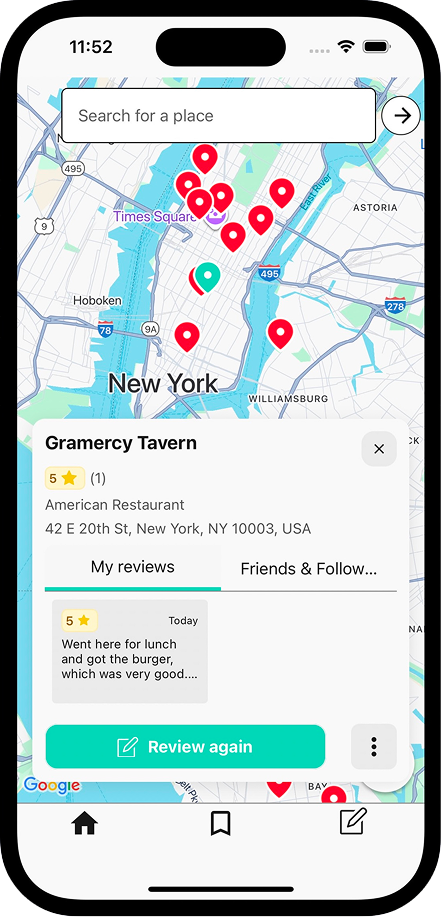
Memolli lets you browse saved restaurants by location on a map.
4. Add photos when they help
Photos can make restaurant lists easier to browse. A quick picture of a dish, menu, storefront, or drink can bring back the memory faster than a paragraph of notes. You do not need perfect food photography. In fact, private lists are better when they do not feel like social media. Bad lighting, half-finished plates, and quick snapshots are fine if they help you remember your experience.
Memolli lets you attach photos directly to your reviews, so the picture, rating, notes, and place all stay together. Over time, that turns your restaurant list into a visual record of the meals, drinks, and places you actually want to remember.
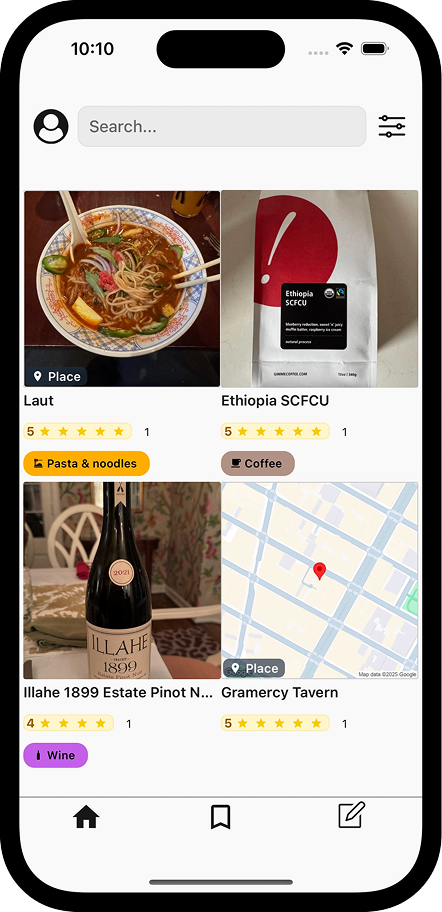
Memolli’s gallery view makes it easy to browse the food and drink photos you have saved.
5. Keep recommendations from friends separate from the internet
Anonymous reviews can be useful, but recommendations from people who know you are often better. If a friend says, “You would love this place,” save it. Add who recommended it and why. Later, that note may matter more than a 4.6-star average from strangers. I wrote more about that idea in why your opinion matters more than a 4.6-star average.
Memolli is not a public review platform. It is built for your own private thoughts first, while still giving you ways to connect with people you actually know. You can keep your notes to yourself, share a useful list with a friend, or invite someone into a list when you want their recommendations in the same place.
6. Choose the right private restaurant list app
You can keep a private restaurant list in a lot of places, but the best tool depends on what you want to remember. A simple notes app may be enough for quick thoughts. Google Maps is useful for saved places and directions. But if you want notes, ratings, photos, maps, lists, sharing, and export in one place, a purpose-built restaurant journal app will usually be easier to keep using.
| Tool | Best for | Limitation |
|---|---|---|
| Notes app | Quick private thoughts | Hard to map, sort, browse visually, or attach context to places |
| Spreadsheet | Structured tracking | Too much friction on mobile and not natural for photos |
| Google Maps list | Saving places and directions | Better for discovery than personal notes or private memories |
| Photo album | Visual memory | Hard to search by place, rating, recommendation, or list |
| Memolli | Private restaurant journaling | Smaller ecosystem than general-purpose apps |
The right tool depends on how much you care about privacy, photos, maps, search, and long-term ownership of your notes. If you are weighing a purpose-built restaurant journal against a general notes app, you may also like Memolli versus note-taking apps.
Memolli is the best fit if you want the private restaurant list itself to be the center of the experience. It combines notes, ratings, photos, maps, lists, sharing, and export in one place instead of making you stitch together a notes app, a map app, and your camera roll.
If you want a private restaurant list you can keep building over time, try Memolli for free.